


Measuring physical objects no longer necessitates the use of a tape measure, or a ruler with today’s modern smartphone technology. iPhone and Apple’s Measure app have completely changed the way we calculate distances, room measurements and even people heights thanks to its augmented reality (AR) based calculation power. It’s an incredibly powerful feature built into iOS, but it is a tool that many people either don’t know about or just consider useful for the most basic of tasks.
From measuring furniture for a new home arrangement to checking the dimensions of walls, or seeing how an object will fit into space when you’re on the go, the iPhone Measure app can help you estimate sizes quite accurately. This comprehensive guide covers the fact about what is Measure app, how to use it, how accurate it is and so on.
What Is iPhone Measure App?
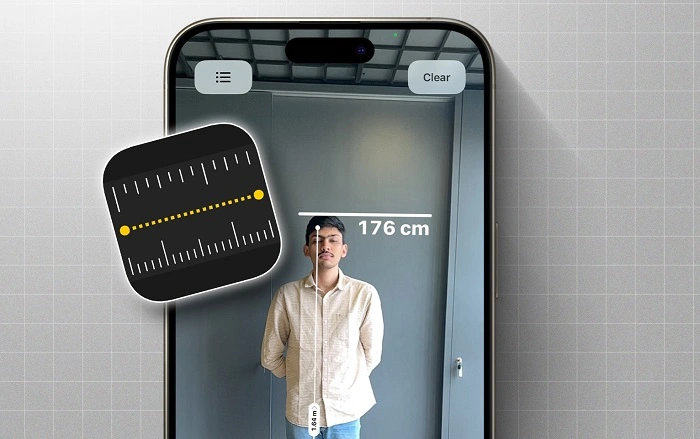
Apple’s built-in app to measure real-world objects, the Measure app, uses augmented reality (AR) technology to give you measurements through your iPhone’s camera. The app calculates distances, lengths, heights and rectangular dimensions of surfaces and edges by recognition of surface areas, edge lengths and points.
Preinstalled on most modern iPhones with the latest versions of iOS, the Apple Podcasts app is what many people still use to listen to podcasts. It works purely with the device’s camera and sensors, does not need an internet connection.
Which iPhones Support the Measure App?
The Measure application is optimized on the iPhones that have advanced motion sensors and AR programs.
Supportable devices are, as a rule, the following:
- iPhone 8 and newer
- iPhone (2nd generation and onwards)SE.
- Any iPhone Pro and Pro Max.
Devices that have LiDAR sensors like Pro models are more accurate, particularly when it is dark.
Functionality of the Measure App on iPhone.
Measure app is created with the help of the ARKit which is Apple augmented reality platform to scan the environment around.
Here’s how it functions:
- The camera scans the area
- The application recognizes edges and flat surfaces.
- Measurements are marked by positioning digital points.
- The distance between points is real time calculated.
It takes place nearly instantly and is therefore easy to measure without the use of physical equipment.
The Measure App on iPhone Tutorial.
The Measure app is easy to use even to the novice.
Step-by-Step Instructions
- Go to the Measure application on your phone on your iPhone.
- Slowly move your phone so that surface detection can be permitted.
- Match the white dot with the point of departure.
- Tap the Add (+) button
- Swipe to the option of adding and Tap Add (+) once more.
- The number is displayed on the screen.
There is an option to use inches, feet or meters in displaying measurements.
Also Read: How to Delete an App on Roku
Measuring rectangle-shaped objects.
The Measure app has the ability to automatically recognize rectangular objects including tables, doors and screens.
Steps:
- Aim the camera at the object that is rectangular in shape.
- Wait till a yellow outline has been formed.
- Tap the outline
- The application shows length, width and area.
This aspect has been very helpful with furniture and interior planning.
Measurement of Height of a person using iPhone.
Measure App has one of the most popular things, which is automatic heights measurements.
To measure a person’s height:
- Open the Measure app
- Make sure that the individual is completely on screen.
- Lie in an upright position on a plane surface.
- The height manifests itself automatically between the head and the toe.
This feature is optimal in open light and visibility.
What is the accuracy of the Measure App on the iPhone?
The precision is determined by a number of factors:
- Lighting conditions
- Camera quality
- Surface texture
- Device model
On average:
- Short measurements are precise to a matter of a few millimeters.
- Distinctions may exist over greater distances.
- Devices with LiDAR are more accurate.
Although it is not a substitute for professional tools, the Measure app can be used on a daily basis.
Transforming Measurement Unit in the Measure App.
The measurements can be easily changed.
Steps:
- Open Settings
- Go to Measure
- Select Measurement Units
- Imperial or Metric
This is whether to use Imperial or Metric.
The application is updated automatically without rebooting.
Measurement Saving and copying.
Measure app enables the use of measurements and storing of the measurements.
You can:
- Make a screen shot with measurements on it.
- Transfer values to notes or messages.
- Make measurements in the process of planning or shopping.
This is particularly effective in a case of multiple measurements.
Typical applications of the Measure App in iPhone.
Measure app is applicable in most real-life situations:
- Furniture Measuring Furniture Before Purchase.
- Measurement of wall sizes to be decorated.
- Estimating room size
- Quantifying monitor screens or TV screens.
- Checking the dimensions of objects on the way to.
It is easy to use and therefore suitable in estimation within a short duration.
Shortcomings of the Measure App.
The Measure app is limited in spite of its usefulness.
- Unsuitable in the professional construction work.
- Precision is reduced during a low light (non-LiDAR devices).
- An error may exist with reflexive or transparent surfaces.
- Needs a constant movement of the hand.
These limitations can be understood to achieve improved outcomes.
Suggestions to have the most out of the Measure App.
To improve accuracy:
- Use good lighting
- Move the phone slowly
- Compared to plane surfaces.
- And shiny or reflective objects should be avoided.
- Calibrate the phone by maneuvering the phone.
Minor corrections can also enhance the reliability of measurement greatly.
Measure App compared to Physical Measuring Tools.
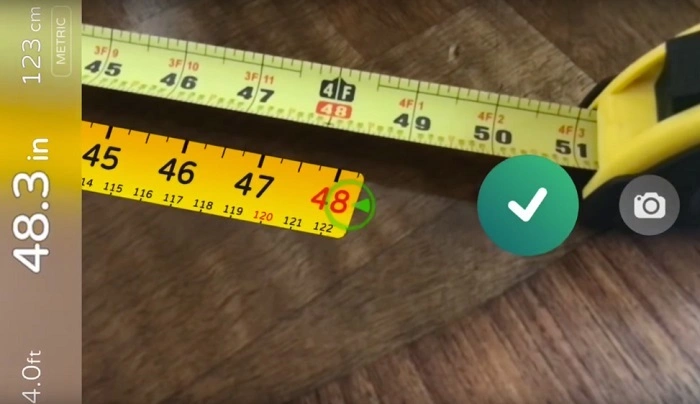
Measure app advantages:
- Always available
- No extra tools needed
- Fast and convenient
- Physical tool advantages:
- Higher precision
- Fit to work-related activities.
- No dependence even on lighting or sensors.
Measure apps should not be used instead of other relevant tools but as a supplement.
Troubleshooting Problematic Apps.
In case the application is not functioning correctly:
- Restart your iPhone
- Ensure iOS is up to date
- Clean the camera lens
- Move to better lighting
- Scansurfaces Reopen the app and rescan surfaces.
The majority of problems can be fixed within a short amount of time through simple troubleshooting.
Privacy and Safety of the Measure App.
The Measure application is a visual processing application that works locally.
- There are no automated images stored.
- No need to connect to the internet.
- No data shared externally
This is what renders it a safe and privacy friendly tool.
Frequently Asked Questions (FAQ) About Measure App For Iphone
Is the Measure app free on my iPhone?
Yes, the Measure app is absolutely free and doesn’t even cost you anything to download because it comes built-in with iOS.
If it’s not there, can I download the Measure app?
And yes, you can get it from the App Store if they took it off.
Is the Measure app offline?
Yes, it does work offline.
How accurate is the Measure app when furniture shopping?
Yes, close enough for most furniture measurements.
How come Measure app doesn’t detect surfaces?
Darkness, reflections or old software can make it difficult to detect.
Final Thoughts
Measure is one of the new augmented-reality apps in the iOS 12 software for Apple iPhone users, and it will change the way you think about your smartphone. It may not replace professional measuring instruments but for casual and well working accuracy level.
Applying to measuring furnishings, rooms (dimensions, area, volume) and people’s height the easy, fast and accurate measurement will be at your service without using a sophisticated distance meter — all this is meant and offered by the updated version of electronic ruler on Apple devices! So long as it’s well-lit and you’re holding steady, you won’t even need to lift a finger because the Measure app can give you accurate measurements on the fly.
For anyone looking for a smarter way to measure without carrying tools, the Measure app is one of the iPhone’s most criminally underappreciated features.